Your Nightscout glucose, on your desktop.

Two small, free apps that read your own Nightscout site. NightscoutBar puts your reading and trend arrow in the Mac menu bar. NightscoutWidget is a small window on Windows that stays on top of everything else.

Free and open source. Works with any CGM that uploads to Nightscout. Try the demo

Try them here.

Working copies of both apps. Click the reading in the menu bar, change the chart’s range, or drag the widget around.

Demo data only. These readings are made up and change every few seconds. Nothing here is connected to anyone’s Nightscout site.

FinderFileEditViewGoWindowHelp
Tue 10:42
5.6→
+0.1 mmol/L
just now
IOB1.35 U
COB12 g
Updated 10:42
Reading and trend
Your latest reading and an arrow for which way it’s heading, with the change since the last reading and how long ago it came in.
Your range, your units
Coloured against the target range you set, in mmol/L or mg/dL. Refreshes every 30 seconds to 5 minutes, or when you ask.
IOB and COB
Insulin and carbs on board, from your Nightscout device status, as Trio, Loop and AAPS upload it.
Old data
If no reading has arrived for 12 minutes, the value goes grey and a warning appears, so you don’t trust an old number:7.5↑ ⚠︎
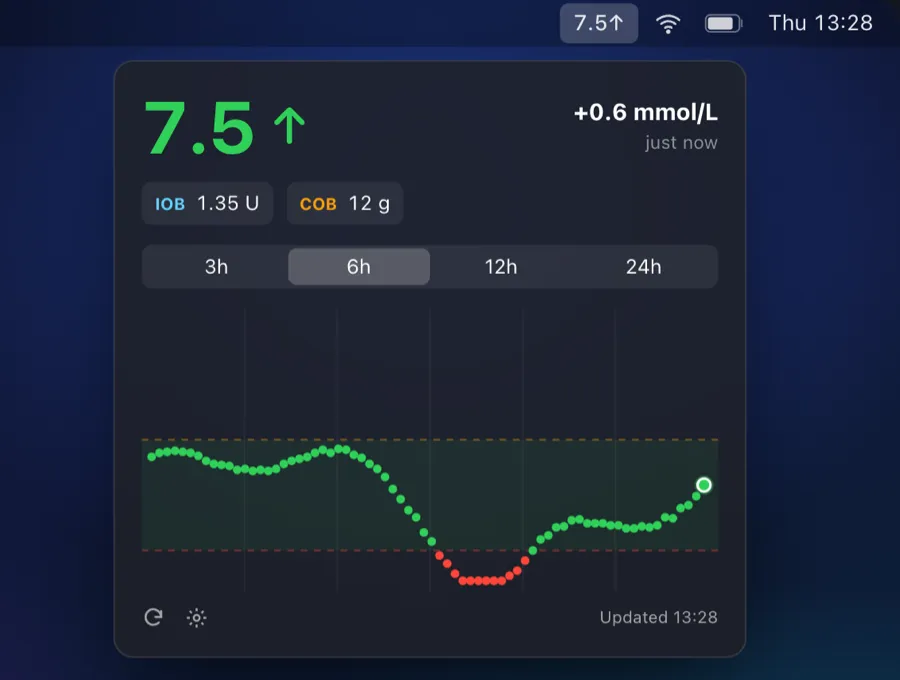
NightscoutBar: 7.5 and an up arrow in the Mac menu bar, and below it the pop-up with the reading, +0.6 mmol/L, IOB 1.35 U, COB 12 g, and a 6-hour chart.

For Mac

A glance at the menu bar, a click for the chart.

The reading stays in the menu bar whichever app you’re in. Click it and the chart drops down underneath.

Chart
3, 6, 12 or 24 hours, with your target range shaded and a line at each threshold.
Launch at login
One switch in its settings.
Apple Silicon or Intel
One universal app for both.
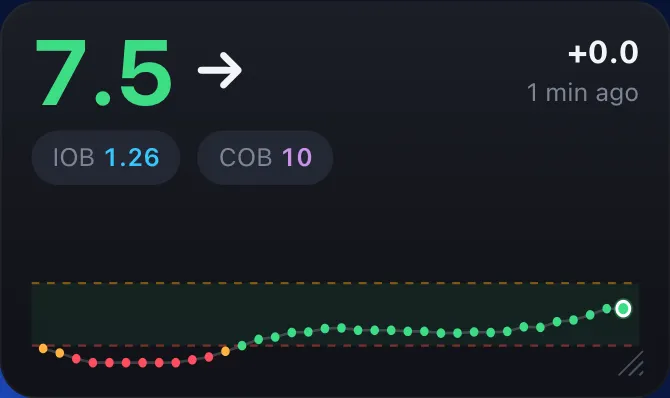
NightscoutWidget: 7.5 and a flat arrow, +0.0, 1 min ago, IOB 1.26 and COB 10, over a 3-hour graph with the target range shaded.

For Windows

Put it wherever you’re working.

A frameless, see-through window. Drag it anywhere, resize it from its corner, and fade it to the opacity you want.

Graph
Appears once the widget is tall enough for it.
Tray and menu
A system tray icon and a right-click menu. Only one copy runs at a time.
Start with Windows
Put a shortcut to it in your Startup folder.
One file
A portable .exe with .NET built in, so there’s nothing else to install.

Set up in about a minute

  1. 1

    Download and open it

    On a Mac, open the .dmg and drag NightscoutBar into Applications. On Windows, run NightscoutWidget.exe. There’s no installer and no .NET download.

  2. 2

    Enter your Nightscout URL

    Paste your site’s address into Settings, for example https://yourname.herokuapp.com.

  3. 3

    Add a token if your site needs one

    In Nightscout, go to Admin Tools, add a subject with the “readable” role and copy its token. Public sites can skip this step.

Your readings go nowhere else.

The apps connect only to the Nightscout site you enter. There’s no account, no analytics, no crash reporting and no server in between.

Account
None
Tracking
None
Talks to
Your Nightscout

What stays with you

  • Your Nightscout URL and settings, on your computer
  • Your token in the macOS Keychain, or encrypted with Windows Data Protection so only your Windows account can read it
  • Your readings: never sent to us or anyone else

Good to know

  • Use a read-only (readable) token, never your API secret
  • If your site allows public reading, anyone who knows its address can see your readings

The privacy page has the details, including how to remove everything.

Not a medical device

NightscoutBar and NightscoutWidget show data from your own Nightscout site for convenience only. Don’t make treatment decisions from them. Always check your CGM app or meter.

Questions

Which CGMs does it work with?
Any CGM that uploads to Nightscout, including Dexcom (G6, G7, ONE) and FreeStyle Libre (2, 3) through apps such as Dexcom Share bridge, xDrip+, xDrip4iOS, Juggluco, Loop, Trio or AAPS. If you can see your readings on your Nightscout site, the apps can show them.
Is it free?
Yes, both apps are free and the code is open source on GitHub. There are no accounts, subscriptions or ads.
Is the Mac app safe to open?
Yes. NightscoutBar is signed with an Apple Developer ID and notarised by Apple, so it opens like any other app with no security warnings. It runs on both Apple Silicon and Intel Macs.
Windows shows “Windows protected your PC”.
SmartScreen shows this for apps that aren’t code-signed. Click More info, then Run anyway.
Why is the Windows download around 60 MB?
The .NET runtime is built into the exe, so it runs on any Windows 10 or 11 PC with nothing else to install.
What’s a “readable” token?
It’s a read-only access token from your Nightscout site. In Nightscout, open Admin Tools, add a subject with the readable role, and copy its token into the app’s settings. If your site is public (AUTH_DEFAULT_ROLES=readable), you don’t need one.
Where do IOB and COB come from?
From your Nightscout device status. The apps understand uploads from Trio and AAPS (openaps.iob, suggested and enacted) and from Loop (loop.iob and loop.cob).
Free for Mac and Windows.